
Gamdom Promo Code Canada: 15BOOST
The Gamdom affiliate code 15BOOST connects your new account to an exclusive welcome package. You can enter it while registering or add it later inside the rewards area, and this page shows both routes with real screenshots.
Also worth reading: free spins and promotions, and Gamdom on mobile.
How to activate the Gamdom welcome bonus
- Open Gamdom through the referral linkUse the Claim Bonus button on this page so the offer is linked correctly.
- Start registrationPick a username, add your email and choose a password on the Create Account form.
- Enter 15BOOST into the referral code fieldThe field sits directly below the password box. Type the code exactly as shown.
- Complete registrationConfirm the terms checkbox and press Start Playing to finish creating the account.
- Check Rewards, then Special RewardsSign in and open the Rewards section from the main menu to see what the code unlocked.
- Access the available promotional benefitsEligible offers such as the 15% rakeback appear in Special Rewards with an Activate button.
Use 15BOOST when you sign up
The fastest route is the registration form itself. When you open Gamdom through the referral link and press Sign Up, the Create Account panel includes a dedicated Referral Code field under the password box.
Type 15BOOST there, tick the terms box and press Start Playing. Your account is then linked to the offer from the very first minute, before you make any deposit.
Sign Up with 15BOOST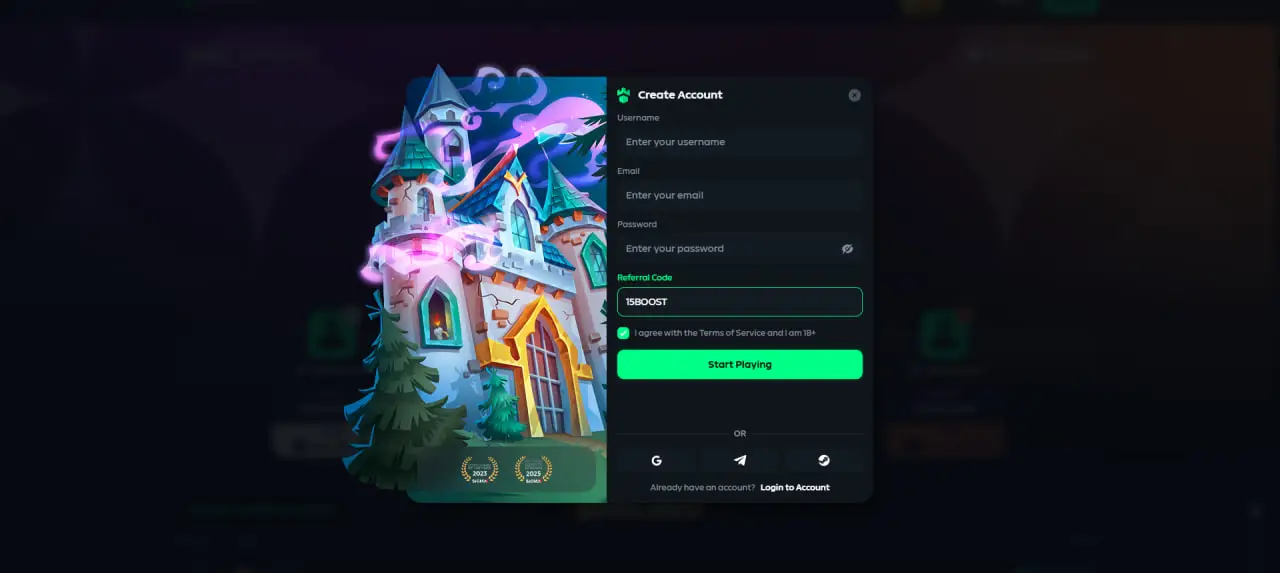
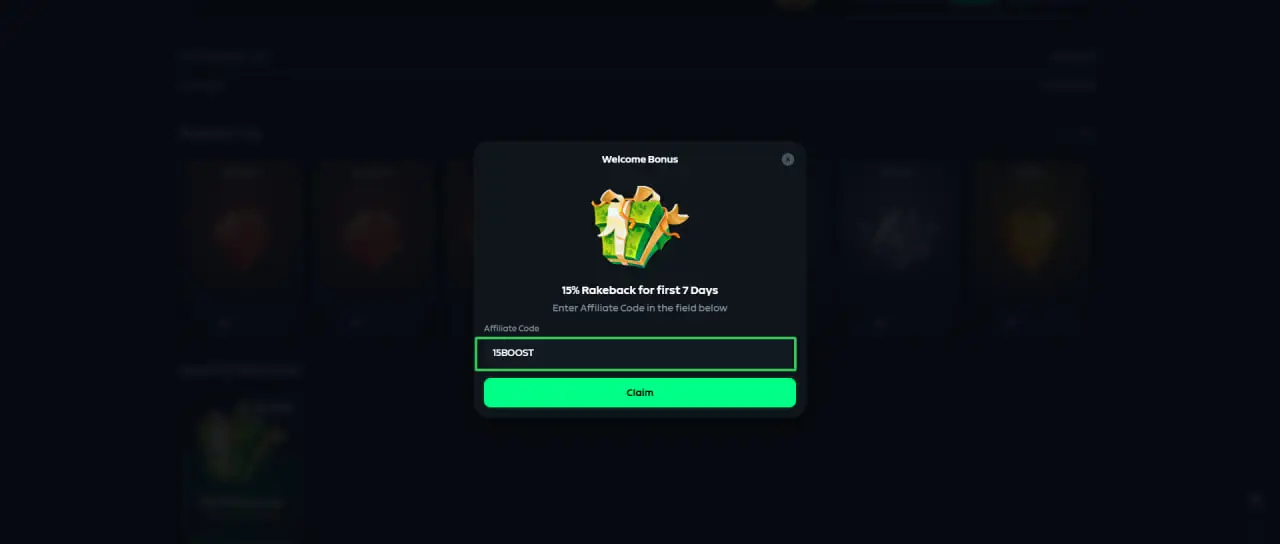
Add the code from Rewards → Special Rewards
Already have an account without a code? Sign in and open Rewards from the main menu, then switch to Special Rewards. The Welcome Bonus panel there accepts the affiliate code.
Enter 15BOOST in the field, press Claim, and the linked offers become available on your account.
Then activate your rakeback
Once the code is linked, the Special Rewards tab shows the exclusive offer: 15% Rakeback for your first 7 days. Press Activate on the card and the rakeback window starts counting.
The same Rewards area holds the Royalty Up progression, so it is worth checking back as you play. Promotions shown there can change over time, and conditions are displayed inside Gamdom when you claim.
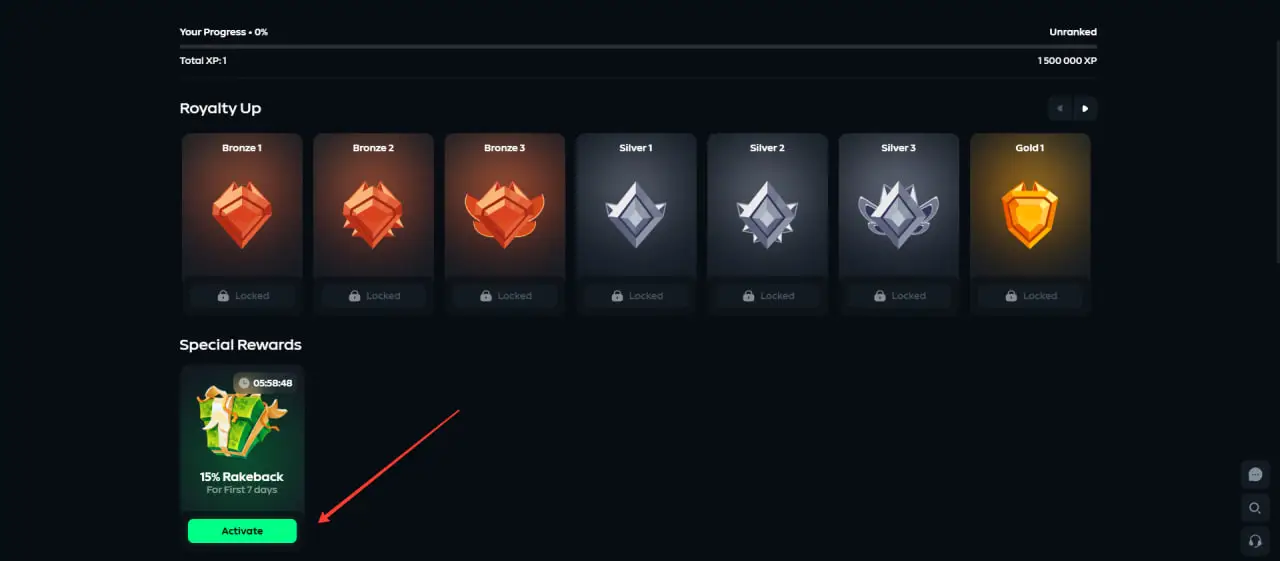
What the Gamdom welcome bonus includes
15% Rakeback for 7 Days
Exclusive to the code. Rakeback returns a share of the house edge on your play during the first week, claimable from the rewards area.
100% Deposit Bonus
A qualifying deposit is matched in full. The exact terms are shown inside Gamdom at the moment you claim the offer.
$1M+ in Monthly Leaderboards
Ongoing leaderboard races with combined prize pools above $1M every month, open to active accounts including Canadian players.
Gamdom promo code FAQ
The referral code is 15BOOST. It is tied to 15% rakeback for 7 days (exclusive), a 100% deposit bonus and $1M+ in monthly leaderboards.
During registration there is a dedicated referral code field on the Create Account form. Type 15BOOST there before completing sign-up. If you already registered, open Rewards, then Special Rewards, and enter or activate the code from the Welcome Bonus panel.
Yes. Sign in, open the Rewards section and go to Special Rewards. The Welcome Bonus panel there accepts the affiliate code 15BOOST, and eligible offers such as the 15% rakeback appear with an Activate button.
Gamdom uses the terms referral code and affiliate code for the same field. 15BOOST works as both: it links your account to the offer and unlocks the associated welcome benefits.
Entering the code links your account to the offer, but you should still open Rewards and Special Rewards to activate what is shown there. Availability and conditions are displayed inside Gamdom when you claim.
Grab the code and get started
Copy 15BOOST, open Gamdom through the link, and the welcome package will be linked to your new account.